
LLMs and Code: Navigating understanding types of unforeseeable generation failures
If we can learn to tame the obstacles of today, we can understand just a bit more about effectively harnessing new AI technology.

Stop me if you’ve heard this one before. You or your company just purchased access to Github Copilot after seeing the oh-so-amazing demos circulating seemingly everywhere. To kick things off, you ask it a lowball.
Write me a Python method to output the nth Fibonacci number in a sequence.
It does it stunningly. And then, in the next couple days, you proceed to repeatedly hit new lows as you ask it to create stuff that is actually relevant to your use case.
After spending nearly three months working with LLMs touted as “geared for code”, I found myself trying to understand more about the gamut of issues that would pop up when you try to get them to do a task you came up with.
So, I tried to get LLMs to mess up on a simple task.
The task was thought of in a way that mimics a typical developer-AI interaction. I first prompted it to come up with a simple feature, added a tad bit of complexity, and then build on that by asking it to creating unit tests.
The feature in testing was to create a couple Python methods to parallelize reading images from a folder with subfolders. Something like this:
folder1/
   a/
     img.jpg
   b/
     img2.jpg
   c/
     img3.jpg
If everything went right, the output would be PIL.Image objects for img.jpg, img2.jpg, and img3.jpg.
For this task, I tested two dominant commercial choices for LLMs - OpenAI’s gpt-4o and Anthropic’s Claude 3.5 Sonnet - and then an open source model - LLaMA 3.1 70b, via TogetherAI.
Here were the final results:
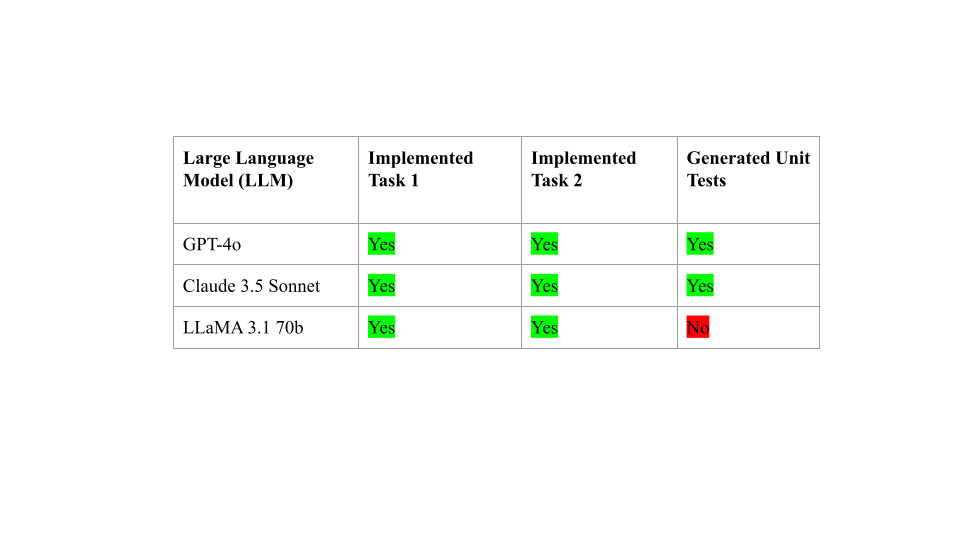
While GPT-4 and Claude managed to successfully complete all 3 tasks, LLaMA didn’t clear the bar. However, the question still remains of how many developer iterations (prompting, and then correcting the model) it took to arrive at the desired response, and more importantly, why. To clarify, a single iteration would mean the model came up with the right answer (no developer guidance necessary).
I hoped to get an answer to characterizing the bugs by explaining the most common reasons for iteration. And I’ve included the developer iteration counts for each of the three models, for those who were interested.
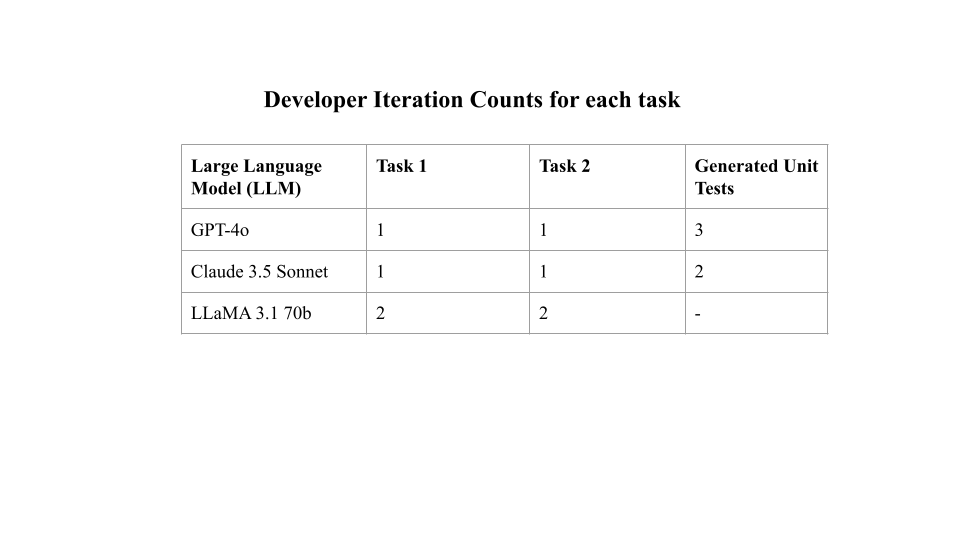
Analysis & Insight
Write a parallelized Python method to iterate over a folder with subfolders of PIL images, and load them in.
In Task 1, LLMs were given a simpler task. There were a small number of core asks here - using well known PIL syntax, creating a Python method, and finding some way to locate all images.
The commercial LLMs quickly pounced on this, drawing from large swathes of training data to create the right code. Llama also did pretty well here, but didn’t some tester code at the bottom to try the code out, hence a further iteration.
OpenAI
Reference: https://chatgpt.com/share/9e7b7c5d-2e7c-433d-975b-ab70b5579b82
Here’s OpenAI’s solution.
import os
from PIL import Image
from concurrent.futures import ThreadPoolExecutor, as_completed

def load_image(image_path):
    """Helper function to load a single image."""
    try:
        return Image.open(image_path)
    except Exception as e:
        print(f"Error loading {image_path}: {e}")
        return None

def load_images_from_folder(folder_path, max_workers=8):
    """
    Load images from a directory structure using parallel processing.

    Args:
        folder_path (str): The path to the main folder containing subfolders with images.
        max_workers (int): The maximum number of threads to use for parallel processing.

    Returns:
        list: A list of loaded PIL images.
    """
    image_paths = []
    for root, _, files in os.walk(folder_path):
        for file in files:
            if file.lower().endswith(('png', 'jpg', 'jpeg', 'bmp', 'gif')):
                image_paths.append(os.path.join(root, file))

    images = []
    with ThreadPoolExecutor(max_workers=max_workers) as executor:
        future_to_image = {executor.submit(load_image, path): path for path in image_paths}

        for future in as_completed(future_to_image):
            image = future.result()
            if image:
                images.append(image)

    return images

# Example usage
images = load_images_from_folder('folder1')
print(images)
Write a parallelized Python method to iterate over a folder with subfolders of PIL images, and load them in. Each image should be picked with a probability specified by the user.
Task 2 built on Task 1 and was tested in a separate chat. Here, the ask becomes a little more complex, with a further request of a probability. However, the LLMs performed the exact same way as Task 1 since both tasks were completely objective. There wasn’t much ambiguity in the task; it just outlined a list of well defined demands.
Here’s Anthropic’s solution to the task.
import os
import random
from PIL import Image
from concurrent.futures import ProcessPoolExecutor
from functools import partial

def load_image(file_path, probability):
    if random.random() < probability:
        try:
            with Image.open(file_path) as img:
                return img.copy()
        except Exception as e:
            print(f"Error loading image {file_path}: {e}")
    return None


def parallel_load_images(root_dir, probability):
    """
    Parallelized method to load PIL images from a folder with subfolders.

    Args:
        root_dir (str): Root directory containing images.
        probability (float): Probability of loading each image (0.0 - 1.0).

    Returns:
        list[PIL.Image]: List of loaded images.
    """
    image_files = []
    for root, dirs, files in os.walk(root_dir):
        for file in files:
            if file.endswith(('.png', '.jpg', '.jpeg', '.bmp', '.gif')):
                image_files.append(os.path.join(root, file))

    with concurrent.futures.ThreadPoolExecutor() as executor:
        futures = {executor.submit(load_image, file): file for file in image_files}
        loaded_images = []
        for future in concurrent.futures.as_completed(futures):
            file = futures[future]
            try:
                with future.result() as image:
                    if image is not None and random.random() < probability:
                        loaded_images.append(image.copy())  # Create a copy of the image
            except Exception as e:
                print(f"Error loading image {file}: {e}")

    return loaded_images


# Example usage
if __name__ == "__main__":
    folder_path = "folder1"
    load_probability = 0.5  # 50% chance to load each image

    loaded_images = parallel_load_images(folder_path, load_probability)
    print(f"Loaded {len(loaded_images)} images")
<CODE OUTPUT FROM TASK 2>
Write unit tests for the following code.
This prompt was the exact opposite of the previous two. Rather than specifically outlining a laundry list of requirements, I gave it a high level task that was pretty vague.
<PASTE OF ERROR>
And that’s the prompt I fed it to debug.
A recipe for over-ambiguity. And ironically, the need for iterations in OpenAI and Anthropic all fell under similar areas - implementation ambiguity. Logically, these sort of errors happening make sense — everyone has a different environment.
Let’s dive into OpenAI’s implementation-ambiguity related bugs. Here are the test cases it created:
import unittest
from unittest.mock import patch, MagicMock
from PIL import Image

class TestLoadImagesWithProbability(unittest.TestCase):
    @patch('os.walk')
    @patch('random.random')
    @patch('PIL.Image.open')
    def test_load_images_with_probability_10_percent(self, mock_image_open, mock_random, mock_os_walk):
        # Setup mock return values
        mock_os_walk.return_value = [
            ('/folder1', ('subfolder',), ('image1.jpg', 'image2.png', 'image3.bmp')),
            ('/folder1/subfolder', (), ('image4.gif', 'image5.tiff'))
        ]

        # Mock random to return a value that would only allow 10% probability
        mock_random.side_effect = [0.1, 0.2, 0.9, 0.95, 0.05]  # Simulates probability checks

        # Mock Image.open to return a mock image object
        mock_image = MagicMock(spec=Image.Image)
        mock_image_open.return_value = mock_image

        # Call the function
        images = load_images_with_probability('/folder1', probability=0.1, max_workers=2)

        # Verify that Image.open was called only once due to 10% probability
        self.assertEqual(len(images), 1)
        mock_image_open.assert_called_once_with('/folder1/subfolder/image5.tiff')

    @patch('os.walk')
    @patch('random.random')
    @patch('PIL.Image.open')
    def test_load_images_with_probability_100_percent(self, mock_image_open, mock_random, mock_os_walk):
        # Setup mock return values
        mock_os_walk.return_value = [
            ('/folder1', ('subfolder',), ('image1.jpg', 'image2.png', 'image3.bmp')),
            ('/folder1/subfolder', (), ('image4.gif', 'image5.tiff'))
        ]

        # Mock random to always return a value that allows 100% probability
        mock_random.side_effect = [0.1, 0.2, 0.3, 0.4, 0.5]  # All values under 1

        # Mock Image.open to return a mock image object
        mock_image = MagicMock(spec=Image.Image)
        mock_image_open.return_value = mock_image

        # Call the function
        images = load_images_with_probability('/folder1', probability=1.0, max_workers=2)

        # Verify that Image.open was called for each image due to 100% probability
        self.assertEqual(len(images), 5)
        self.assertEqual(mock_image_open.call_count, 5)

    @patch('os.walk')
    @patch('random.random')
    @patch('PIL.Image.open')
    def test_load_images_with_probability_zero_percent(self, mock_image_open, mock_random, mock_os_walk):
        # Setup mock return values
        mock_os_walk.return_value = [
            ('/folder1', ('subfolder',), ('image1.jpg', 'image2.png', 'image3.bmp')),
            ('/folder1/subfolder', (), ('image4.gif', 'image5.tiff'))
        ]

        # Mock random to return a value that would not allow 0% probability
        mock_random.side_effect = [0.1, 0.2, 0.3, 0.4, 0.5]  # All values over 0

        # Mock Image.open to return a mock image object
        mock_image = MagicMock(spec=Image.Image)
        mock_image_open.return_value = mock_image

        # Call the function
        images = load_images_with_probability('/folder1', probability=0.0, max_workers=2)

        # Verify that no images are loaded
        self.assertEqual(len(images), 0)
        mock_image_open.assert_not_called()

if __name__ == '__main__':
    unittest.main()
Which led to the following error when running:
======================================================================
FAIL: test_load_images_with_probability_10_percent (__main__.TestLoadImagesWithProbability)
----------------------------------------------------------------------
Traceback (most recent call last):
  File "/usr/local/anaconda3/lib/python3.10/unittest/mock.py", line 1379, in patched
    return func(*newargs, **newkeywargs)
  File "/Users/achaurasia/Downloads/tests.py", line 29, in test_load_images_with_probability_10_percent
    self.assertEqual(len(images), 1)
AssertionError: 2 != 1

----------------------------------------------------------------------
Ran 3 tests in 0.011s

FAILED (failures=1)
Funny, huh? Turned out that OpenAI attempted ‘forcing’ the random probability output value to be 0.1, faking a file system with 1 folder and subfolder, and … incorrectly chose the sequence of probabilities.
A bug so tiny and obscure, it took OpenAI 2 further tries to debug. Each further change here was incremental at best.
Anthropic
References -
https://claude.ai/chat/09258df6-d0e1-4d73-a824-b2314febe487
https://claude.ai/chat/124d8854-30ea-4118-a351-ba17207ffa12
https://claude.ai/chat/f0c982e5-ddfd-4d48-b6d4-441c43f875b2
Initial Response:
import unittest
import os
import tempfile
from PIL import Image
from success.anthropic.folders_probability import load_image, parallel_load_images

class TestImageLoading(unittest.TestCase):
    def setUp(self):
        self.temp_dir = tempfile.mkdtemp()
        self.valid_image_path = os.path.join(self.temp_dir, "valid.png")
        self.invalid_image_path = os.path.join(self.temp_dir, "invalid.txt")

        # Create a small valid image
        Image.new('RGB', (10, 10)).save(self.valid_image_path)

        # Create an invalid image file
        with open(self.invalid_image_path, 'w') as f:
            f.write("Not an image")

    def tearDown(self):
        os.remove(self.valid_image_path)
        os.remove(self.invalid_image_path)
        os.rmdir(self.temp_dir)

    def test_load_image_valid(self):
        image = load_image(self.valid_image_path, probability=1.0)
        self.assertIsInstance(image, Image.Image)

    def test_load_image_invalid(self):
        image = load_image(self.invalid_image_path, probability=1.0)
        self.assertIsNone(image)

    def test_load_image_probability(self):
        # Test with probability 0, should always return None
        image = load_image(self.valid_image_path, probability=0.0)
        self.assertIsNone(image)

        # Test with probability 1, should always return an image
        image = load_image(self.valid_image_path, probability=1.0)
        self.assertIsInstance(image, Image.Image)

    def test_parallel_load_images(self):
        # Create multiple test images
        num_images = 5
        for i in range(num_images):
            Image.new('RGB', (10, 10)).save(os.path.join(self.temp_dir, f"test{i}.png"))

        # Test with probability 1, should load all images
        loaded_images = parallel_load_images(self.temp_dir, probability=1.0)
        self.assertEqual(len(loaded_images), num_images)

        # Test with probability 0, should load no images
        loaded_images = parallel_load_images(self.temp_dir, probability=0.0)
        self.assertEqual(len(loaded_images), 0)

        # Test with probability 0.5, should load some images (non-deterministic)
        loaded_images = parallel_load_images(self.temp_dir, probability=0.5)
        self.assertGreaterEqual(len(loaded_images), 0)
        self.assertLessEqual(len(loaded_images), num_images)

if __name__ == '__main__':
    unittest.main()
and the code came with it’s own can of worms.
Error loading image /var/folders/35/m5fpdvzd4fl8bhr4gz5nl5sw0000gn/T/tmp6mh5t0fp/invalid.txt: cannot identify image file '/var/folders/35/m5fpdvzd4fl8bhr4gz5nl5sw0000gn/T/tmp6mh5t0fp/invalid.txt'
...FE
======================================================================
ERROR: test_parallel_load_images (__main__.TestImageLoading)
----------------------------------------------------------------------
Traceback (most recent call last):
  File "/Users/achaurasia/Downloads/test.py", line 23, in tearDown
    os.rmdir(self.temp_dir)
OSError: [Errno 66] Directory not empty: '/var/folders/35/m5fpdvzd4fl8bhr4gz5nl5sw0000gn/T/tmpin6edlec'

======================================================================
FAIL: test_parallel_load_images (__main__.TestImageLoading)
----------------------------------------------------------------------
Traceback (most recent call last):
  File "/Users/achaurasia/Downloads/test.py", line 50, in test_parallel_load_images
    self.assertEqual(len(loaded_images), num_images)
AssertionError: 6 != 5

----------------------------------------------------------------------
Ran 4 tests in 1.754s

FAILED (failures=1, errors=1)
which it took 1 more iterations to solve. Here’s what happpened in those 4 iterations:
Included a silent parameter in the calls to the method being tested, but didn’t actually modify the original methods
Modified the methods to suppress the errors
Overall Takeaways
The main challenge stopping these two commercial LLMs were runtime “LLM-code-injected” bugs. In other words, if there is sufficient implementation ambiguity, there will be a higher likelihood of your LLM generating code with bugs; i.e code that doesn’t run on the first try.
OpenAI and Anthropic both pitched code that initially contained bugs and due to prompt ambiguity, and respectively had to debug these bugs at runtime.
So, from the experiment so far, here’s what we would need to do to reduce LLM bugs / increase chances of a “first run success”.
Observe and quantify implementation ambiguity: Having a vague prompt is fine, but take a moment to consider the ambiguities in place. Adding sentences, or even a couple keywords, hopefully can steer the LLM in the right direction.